One screen for agents on several machines
Agents run almost everywhere I work: a Mac laptop, a Linux desktop, a home Proxmox server, several cloud environments, and sometimes just my Android phone. My setup is messy. Whose is not?
Keeping track of what runs where is the hard part, and the pace does not help. Every week brings a new runner, a new protocol, or a new way to orchestrate the same work. I tried several: Cursor, Antigravity, VS Code, Claude Code, and OpenCode. Each one solves part of the problem. None of them covered the way I actually work.
There is a lot of noise around all of this. Under the noise, the capability is real, and it earns respect. Linus Torvalds put it bluntly in July. AI is a tool, and at this point a clearly useful one. The risks are real too. I wrote about them this week: unreviewed work only builds technical debt faster, and in critical infrastructure some failures cannot be undone.
Under every agent demo there is a harness: the prompts, the tools, the retries, and the evals around the model. Vendors rarely show that part. The model gets the credit and the blame, while the harness stays a mystery. I wrote this post with AI assistance1, and that is part of why the harness matters to me.
I do not work from hearsay. I spent a long time testing these tools on my own, and this post shares part of that experience. Going into the technical mud is not at odds with the strategic big picture. It is how the big picture stays honest. See CTO Coding Again: Leverage or Hiding? and The Hands-On CTO.
Claude Code has a feature I admire: remote control. It works well, but only inside its own environment. That limitation sent me looking further. I read about A2A and other ways to connect agents. I tested several tools that promise to orchestrate them. Most of them wanted to own the whole stack.
One candidate still waits on my list: cotal. I like it because it builds on NATS, the same messaging layer under fluxrig. I still need to test it.
Then I found Paseo. Paseo organizes work the way I do, instead of forcing me into its shape. I run a Paseo daemon on each machine, and the desktop app works as a multi-host client. One space now holds very different work.
I develop fluxrig and finterlace there, maintain content for the JAAB site and this blog, and handle business development with EBS next to consulting projects. The agents live where the work lives. I watch them from one place.
Two walls in Paseo’s plugins
I fixed two things in Paseo’s plugins. I did not plan either of them. Both came from using the tool every day.
The first wall was small. A Paseo workspace can be a single git repository or a plain directory that holds several checkouts. My JAAB workspace is the second kind, and the Git Tree panel ran git log in the workspace directory. A multi-repo workspace failed with “not a git repository” and showed nothing.
I opened PR #1 on the paseo-git-tree plugin, which adds a repository picker. A new gitrepos.list call returns the repositories reachable from the workspace directory. The panel shows a picker pill only when more than one repository exists, so single-repo workspaces see no change. Switching repositories reloads the graph. The README covers the new control in English and Chinese.
I tested it on three multi-repo workspaces, with seven, twenty, and five repositories, plus the single-repo case. The suite reports 43 passing tests.
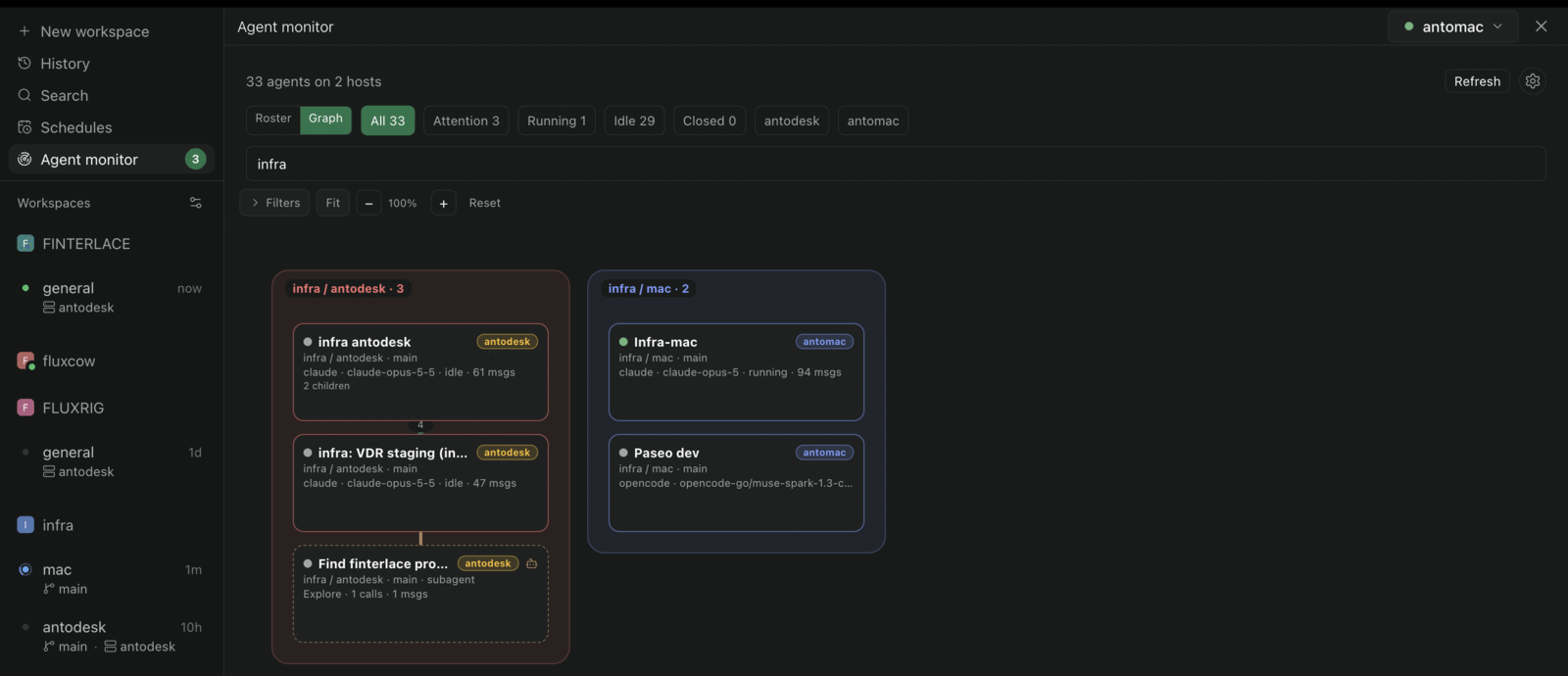
The second wall was the monitor. I could open each host and read its list, but I could not see the whole picture. After years of drawing architectures as code, first with LikeC4 and now with CALM, I trust pictures more than lists. I wrote about the FINOS standard here. A roster tells me agents exist. A graph tells me how they relate: who handed off to whom, who spawned whom, where the messages actually flow.
I did not find a plugin that gave me a real picture of that, so I extended the agent-monitor plugin. PR #364 adds an interactive graph view next to the triage roster. Agents sit in compact project and workspace panels instead of a free-floating cloud. Provider-native subagents appear as dashed nodes.
Edges encode parent hand-offs, message provenance from the timeline, and subagent dispatches, with thickness following the message count. You can drag cards, pan the canvas, zoom, and filter by project or provider. Select a card or an edge to focus its neighborhood while the rest dims.
The graph reads only what the monitor already reads. It takes the tail of each agent timeline and derives the edges from there. It opens no extra socket. The PR includes tests, and I validated the behavior by clicking through it on a live daemon.
To be precise about scope: this graph is its own canvas layout, not a LikeC4 or CALM rendering. Those standards describe system architecture. This picture describes a working session: which agents talked, and who started what. Different question, different drawing.
What changed in practice
Triage got calmer inside each host. Instead of reading a list and keeping the map in my head, I see the roster and the graph in one screen. When something needs attention, the monitor opens on the attention bucket first, so the urgent items are already in front of me.
The PR does that one host at a time. The next step merges the roster, the graph, and the attention list across every online host. A local build of that follow-up showed 33 agents across 2 hosts in one view, which is the screenshot at the top. I track it publicly in issue #365.
I did not adopt Paseo because it has every feature. I adopted it because its shape matched my life: several machines, several projects, several kinds of agent, one pair of eyes. Then I added the one view I was missing.
At JAAB, we help teams manage operational risk and modernize critical platforms without reckless rewrites. If you run agents across more than one machine and want that setup reviewed, get in touch.
I drafted this post in OpenCode, orchestrated through Paseo. The prose review ran on a different model, against the ASD-STE100 skill (standard). ↩︎